Download LMU Hue Flags
Download for Windows
SHA-256: 08c7fb395ab8168f1393c92feeaa15954a0eddc0a239d6268d419c81dd7a84f2
New in version 1.2.0
- New You decide when yellow lights up: under Advanced options on the yellow flag, set how far ahead a slow car may be and below which speed it counts.
- New Choose km/h or mph in Settings.
- Improved The preset tiles in the flag editor now show the real blink pattern: one segment per blink, short segments for Strobe.
- Fixed On the last lap the checkered flag now lights up only in the final 150 m, instead of about 10 seconds before the line at Le Mans.
- Fixed While spectating a team mate, your lights no longer show yellow for every local caution on the lap. LMU’s Shared Memory doesn’t tell which car you are watching, so local yellow stays off while you spectate.
Requirements
- Windows 10 or newer
- A Philips Hue Bridge with Hue lights on your network
- Le Mans Ultimate
Windows warns about the installer?
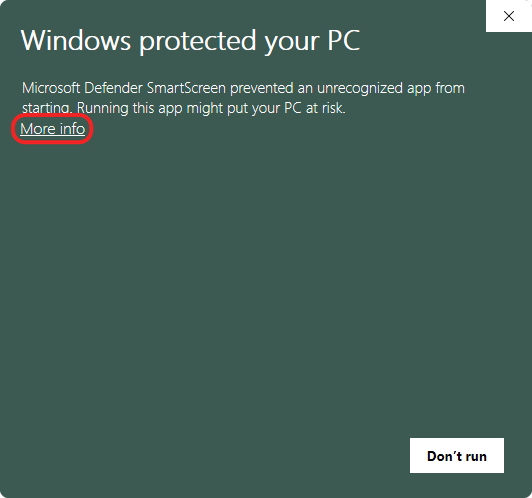
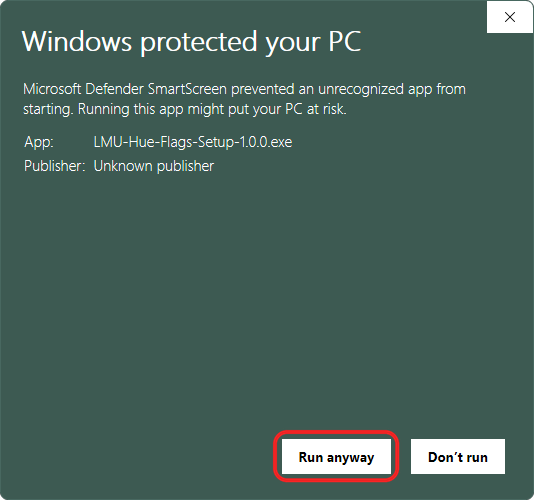
The installer is not code-signed yet. A signing certificate costs money every year, and as a small project we’d rather put that into the app for now. So Windows SmartScreen may show “Windows protected your PC”. Two clicks get you past it:
Try it first, then buy
You can try the app without a license key: connect your bridge, pick your lights and watch every flag light up in the preview. If you like what you see, a license key unlocks live sync with Le Mans Ultimate.